
Site-Specific BGP Communities
Wir versuchen, die VIX-Infrastruktur optimal zu nutzen - und daher auch die Querverbindungen zwischen den VIX-Standorten nicht unnötig zu belasten. Die effizienteste Methode dafür ist, möglichst viel Datenverkehr mit Hilfe von BGP Communities direkt am jeweiligen Standort auszutauschen.
Detailinformationen dazu sind derzeit nur in englischer Sprache verfügbar:
Background
Keeping the traffic local not only reduces the load on the cross-site trunks, but also ensures lower delay/jitter between peering routers and faster routing convergence in case of outages. The graphic shows the ideal flow of payload that occurs when all VIX participants actively support this approach.
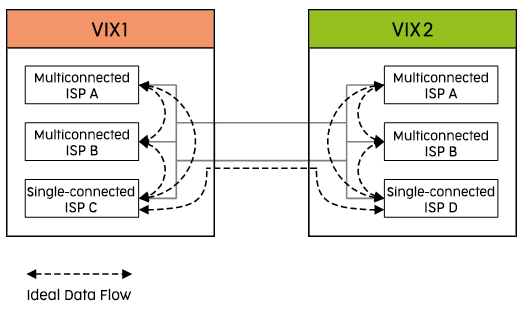
For optimal results, please announce your prefixes with the appropriate site-specific BGP community string!
- Even single-connected VIX participants should announce their prefixes with site-specific communities to give multiconnected peers a chance to distinguish on their routers where the prefix originates from.
- Also those who cannot use others' community strings (for whatever reason) should announce theirs so that their peers can use them.
Dual-connected VIX participants must ensure that (also) their iBGP sessions are configured with "next-hop-self".
Please keep in mind:
- Participants who also peer on other IXPs with the same AS numbers as on VIX may need to adapt this simple system to work properly.
- Participants who have the contractual need to accept unmodified metrics (MEDs) from their VIX peers might have to choose other ways of traffic engineering - or might even be unable to do so.
- Do not use "local-preference" (too much weight shifting, e.g. overrules "as-path length").
Implementation
To identify which announcements come from which VIX location we have established site-specific BGP communities. These communities are:
| Site | BGP Community |
|---|---|
| VIX1 - University of Vienna | 1120:1 |
| VIX2 - Digital Realty | 1120:2 |
| VIX3 - NTT | 1120:3 |
We are happy to offer an example of a dual-connected participant's BGP configuration (Cisco style - others appreciated, please mail to noc (at) vix.at). This configuration example can also be used by single-connected participants.
router bgp <Your AS>
 neighbor VIX peer-group
 neighbor VIX version 4
 neighbor VIX next-hop-self
 neighbor VIX send-community
 neighbor VIX remove-private-AS
 neighbor VIX route-map from-VIX in
 neighbor VIX route-map to-VIX out

 neighbor 193.203.0.1 remote-as 1853
 neighbor 193.203.0.1 peer-group VIX
 neighbor 193.203.0.1 description #peering: ACOnet
 neighbor 193.203.0.25 remote-as 1120
 neighbor 193.203.0.25 peer-group VIX
 neighbor 193.203.0.25 description #peering: VIX Service AS

route-map from-VIX permit 10
 match community 11

route-map from-VIX permit 20
 set metric +1

route-map to-VIX permit 10
 match <whatever you want to announce>
 set community 1120:1

ip community-list 11 permit 1120:1
router bgp <Your AS>
 neighbor VIX peer-group
 neighbor VIX version 4
 neighbor VIX next-hop-self
 neighbor VIX send-community
 neighbor VIX remove-private-AS
 neighbor VIX route-map from-VIX in
 neighbor VIX route-map to-VIX out

 neighbor 193.203.0.1 remote-as 1853
 neighbor 193.203.0.1 peer-group VIX
 neighbor 193.203.0.1 description #peering: ACOnet
 neighbor 193.203.0.25 remote-as 1120
 neighbor 193.203.0.25 peer-group VIX
 neighbor 193.203.0.25 description #peering: VIX Service AS

route-map from-VIX permit 10
 match community 12

route-map from-VIX permit 20
 set metric +1

route-map to-VIX permit 10
 match <whatever you want to announce>
 set community 1120:2

ip community-list 12 permit 1120:2
router bgp <Your AS>
 neighbor VIX peer-group
 neighbor VIX version 4
 neighbor VIX next-hop-self
 neighbor VIX send-community
 neighbor VIX remove-private-AS
 neighbor VIX route-map from-VIX in
 neighbor VIX route-map to-VIX out

 neighbor 193.203.0.1 remote-as 1853
 neighbor 193.203.0.1 peer-group VIX
 neighbor 193.203.0.1 description #peering: ACOnet
 neighbor 193.203.0.25 remote-as 1120
 neighbor 193.203.0.25 peer-group VIX
 neighbor 193.203.0.25 description #peering: VIX Service AS

route-map from-VIX permit 10
 match community 13

route-map from-VIX permit 20
 set metric +1

route-map to-VIX permit 10
 match <whatever you want to announce>
 set community 1120:3

ip community-list 13 permit 1120:3